How I Brought Tom Riddle's Diary to the Web
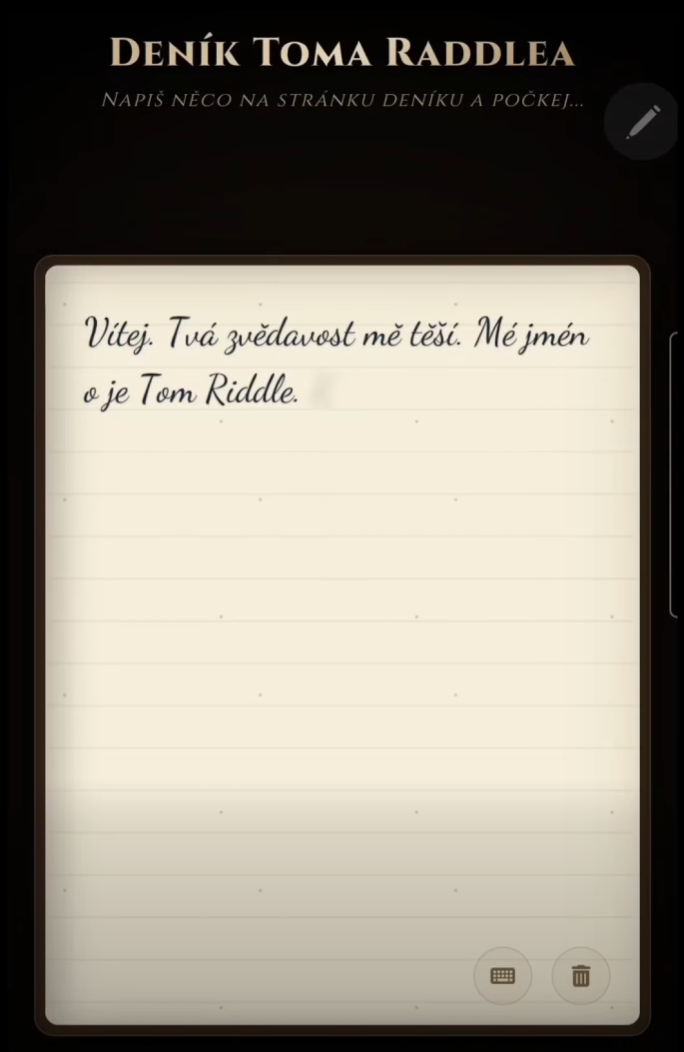
I took the original hardware experiment for the reMarkable Paper Pro and turned it into a web MVP for phones and tablets: ink sinks into parchment, AI reads handwriting, and the answer writes itself back onto the page.

Imagine writing a question on a blank sheet of old parchment. For a moment, nothing happens. Then the ink slowly begins to sink into the page until it disappears. The page falls silent, and a few seconds later an answer starts forming from within the parchment, stroke by stroke, in a flowing hand.
No keyboard. No chat bubbles. Just you, the paper, and a diary that seems a little too patient.
That is the core of my web MVP of Tom Riddle's Diary. I took the original hardware idea built for the reMarkable Paper Pro and rebuilt it as a mobile web experience that runs in an ordinary browser.
Where it started
The inspiration was Maxime Rivest's open-source project MaximeRivest/Riddle.
The original Riddle is an application for the reMarkable Paper Pro, written mainly in Rust, C and C++. It reads stylus strokes from low-level input, works with the display in takeover mode, and renders the reply back onto the e-ink surface so it feels like handwritten text.
It is a beautifully physical project: pen, paper, e-ink, and almost no interface. I asked a simple question: could a similar feeling work without special hardware, just on a phone or tablet?
From reMarkable to the browser
The hardware version can rely on a stylus, Linux input events, and direct display control. The web version lives in a very different world: touch screens, mobile Safari, Android Chrome, different aspect ratios, high-density displays, and browser gestures that love to interfere with drawing.
So I rebuilt the adaptation on a simple stack: Node.js, Express, HTML5, CSS, and vanilla JavaScript. The goal was not to make a regular chatbot wearing a diary costume. The goal was to preserve the main illusion: you write directly on the page, and the page answers.
Canvas instead of a pen, Gemini instead of eyes
I replaced the physical pen with an HTML5 Canvas using Pointer Events. That makes the same surface work with a mouse, finger, or stylus depending on the device.
When the user stops writing for roughly 2.8 seconds, the app treats the page as complete:
- the canvas is exported as a PNG,
- the server sends the image to Gemini Vision,
- the model reads the handwriting,
- and it immediately generates an answer in the persona of Tom Riddle.
The advantage is that the user never has to aim for a text field. They write as they would in a notebook. OCR and the language model stay hidden behind the scene.
Ink that sinks into the paper
The most important part of the experience is not the most technically complex one, but emotionally it decides everything: the ink must not merely vanish. It has to sink in.
After the user finishes writing, the strokes fade through CSS transitions, opacity, and a slight blur. The handwriting does not disappear all at once. It slowly dissolves into the paper texture, creating a small pause in which the page feels alive.
Tom's answer then comes back using Dancing Script and a small animation loop. The text is not rendered all at once. It appears character by character, with small random delays that make it feel closer to a quill than to a printer.
Mobile mode: one page instead of two
On desktop, the diary can feel like an open book. On a phone, a two-page layout quickly becomes too small to read. The app therefore switches to a single-page mode on mobile.
The answer appears directly over the drawing surface as a transparent layer. The user stays in one space: they write on the page, the ink disappears, and the answer appears on the same page.
The precision bug: scale drift
On high-density displays, I ran into an unpleasant bug. The farther the finger moved from the upper-left corner, the more the ink drifted away from the actual touch point. It looked small at first. For handwriting, it was fatal.
The cause was the difference between the canvas' physical pixels and its visual CSS size. I fixed it by explicitly converting pointer coordinates:
const rect = canvas.getBoundingClientRect()
const scaleX = canvas.width / rect.width
const scaleY = canvas.height / rect.height

const x = (event.clientX - rect.left) * scaleX
const y = (event.clientY - rect.top) * scaleY
After that, the ink lands exactly under the pen tip, even on Retina displays.
Video demo
You can also see a short demo on social media:
For the blog, the cleanest option is to embed the local video file and use the social links as fallbacks:
Where this can go next
This MVP is small, but it opens a useful question: what if an LLM does not always have to sit inside a chat window?
In AI Studio, a diary like this could become a tool for writers. The author would not be chatting with an anonymous assistant, but with a specific character they are creating. The character could answer in its own style, rhythm, voice, and visual form. Brainstorming would move from ordinary prompting into a dialogue that feels almost literary.
In Hyperprostor, the parchment could become a distinctive UI widget. Instead of filling out a form, the user could draw a mind map, write by hand, issue commands, or talk to a digital being through an interface that matches its role.
And then comes voice. Whispered input through speech-to-text could make spoken words appear on the parchment. Text-to-speech could let Tom Riddle speak back from the page at the end.
Tom Riddle's Diary on the web shows that artificial intelligence does not have to live only in the cold bubbles of modern chat apps. When handwriting, visual understanding, animation, and a well-chosen model persona meet, the result is not just useful. It feels a little magical.